

Free Databricks Databricks-Certified-Data-Engineer-Professional Exam 2026 Practice Materials Collection
Databricks-Certified-Data-Engineer-Professional Exam Info and Free Practice Test All-in-One Exam Guide Apr-2026
NEW QUESTION # 133
A junior data engineer is working to implement logic for a Lakehouse table named silver_device_recordings. The source data contains 100 unique fields in a highly nested JSON structure.
The silver_device_recordings table will be used downstream to power several production monitoring dashboards and a production model. At present, 45 of the 100 fields are being used in at least one of these applications.
The data engineer is trying to determine the best approach for dealing with schema declaration given the highly-nested structure of the data and the numerous fields.
Which of the following accurately presents information about Delta Lake and Databricks that may impact their decision-making process?
- A. Because Databricks will infer schema using types that allow all observed data to be processed, setting types manually provides greater assurance of data quality enforcement.
- B. Because Delta Lake uses Parquet for data storage, data types can be easily evolved by just modifying file footer information in place.
- C. The Tungsten encoding used by Databricks is optimized for storing string data; newly-added native support for querying JSON strings means that string types are always most efficient.
- D. Schema inference and evolution on .Databricks ensure that inferred types will always accurately match the data types used by downstream systems.
- E. Human labor in writing code is the largest cost associated with data engineering workloads; as such, automating table declaration logic should be a priority in all migration workloads.
Answer: A
Explanation:
This is the correct answer because it accurately presents information about Delta Lake and Databricks that may impact the decision-making process of a junior data engineer who is trying to determine the best approach for dealing with schema declaration given the highly-nested structure of the data and the numerous fields. Delta Lake and Databricks support schema inference and evolution, which means that they can automatically infer the schema of a table from the source data and allow adding new columns or changing column types without affecting existing queries or pipelines. However, schema inference and evolution may not always be desirable or reliable, especially when dealing with complex or nested data structures or when enforcing data quality and consistency across different systems. Therefore, setting types manually can provide greater assurance of data quality enforcement and avoid potential errors or conflicts due to incompatible or unexpected data types.
NEW QUESTION # 134
A data engineer deploys a multi-task Databricks job that orchestrates three notebooks. One task intermittently fails with Exit Code 1 but succeeds on retry. The engineer needs to collect detailed logs for the failing attempts, including stdout/stderr and cluster lifecycle context, and share them with the platform team. What steps the data engineer needs to follow using built-in tools?
- A. Export the notebook run results to HTML; this bundle includes complete stdout, stderr, and cluster event history across all tasks.
- B. Download worker logs directly from the Spark UI and ignore driver logs, as worker logs contain stdout/stderr for all tasks and cluster events.
- C. From the job run details page, export the job's logs or configure log delivery; then retrieve the compute driver logs and event logs from the compute details page to correlate stdout/stderr with cluster events.
- D. Use the notebook interactive debugger to re-run the entire multi-task job, and capture step- through traces for the failing task.
Answer: C
Explanation:
The recommended way to troubleshoot and collect detailed job logs is through the Job Run Details page in Databricks. From there, engineers can export run logs or configure automatic log delivery to a storage destination. The driver and event logs available under compute details provide stdout, stderr, and cluster lifecycle context required for root-cause analysis.
NEW QUESTION # 135
Which statement describes Delta Lake Auto Compaction?
- A. An asynchronous job runs after the write completes to detect if files could be further compacted; if yes, an optimize job is executed toward a default of 128 MB.
- B. Optimized writes use logical partitions instead of directory partitions; because partition boundaries are only represented in metadata, fewer small files are written.
- C. An asynchronous job runs after the write completes to detect if files could be further compacted; if yes, an optimize job is executed toward a default of 1 GB.
- D. Data is queued in a messaging bus instead of committing data directly to memory; all data is committed from the messaging bus in one batch once the job is complete.
- E. Before a Jobs cluster terminates, optimize is executed on all tables modified during the most recent job.
Get Latest & Actual Certified-Data-Engineer-Professional Exam's Question and Answers from
Answer: A
Explanation:
This is the correct answer because it describes the behavior of Delta Lake Auto Compaction, which is a feature that automatically optimizes the layout of Delta Lake tables by coalescing small files into larger ones. Auto Compaction runs as an asynchronous job after a write to a table has succeeded and checks if files within a partition can be further compacted. If yes, it runs an optimize job with a default target file size of 128 MB. Auto Compaction only compacts files that have not been compacted previously.
NEW QUESTION # 136
A data engineer is using Lakeflow Declarative Pipeline to propagate row deletions from a source bronze table (user_bronze) to a target silver table (user_silver). The engineer wants deletions in user_bronze to automatically delete corresponding rows in user_silver during pipeline execution.
Which configuration ensures deletions in the bronze table are propagated to the silver table?
- A. Configure VACUUM on user_bronze to delete files, then rebuild user_silver from scratch.
- B. Use apply_changes without CDF and filter rows where _soft_deleted is true.
- C. Enable Change Data Feed (CDF) on user_bronze, read its CDF stream, and use apply_changes() with apply_as_deletes=True for user_silver.
- D. Enable CDF on user_silver, read its transaction log, and use MERGE to sync deletions.
Answer: C
Explanation:
According to Databricks documentation, Change Data Feed (CDF) allows pipelines to read incremental data changes, including inserts, updates, and deletes, from a Delta table. When deletions occur in the source table, reading the CDF stream ensures downstream consumers receive the deletion records. The Lakeflow Declarative Pipelines API provides the apply_changes() function (or auto-CDC pipelines) with the apply_as_deletes parameter to correctly apply those deletions to the target table. This enables automatic synchronization between bronze and silver layers. Options A and D either require manual handling or complete rebuilds, and C incorrectly applies CDF to the target rather than the source. Therefore, enabling CDF on the bronze table and using apply_as_deletes=True is the correct, Databricks-supported configuration.
NEW QUESTION # 137
A data architect has designed a system in which two Structured Streaming jobs will concurrently write to a single bronze Delta table. Each job is subscribing to a different topic from an Apache Kafka source, but they will write data with the same schema. To keep the directory structure simple, a data engineer has decided to nest a checkpoint directory to be shared by both streams.
The proposed directory structure is displayed below:
Which statement describes whether this checkpoint directory structure is valid for the given scenario and why?
- A. Yes; both of the streams can share a single checkpoint directory.
- B. No; only one stream can write to a Delta Lake table.
- C. No; Delta Lake manages streaming checkpoints in the transaction log.
- D. Yes; Delta Lake supports infinite concurrent writers.
- E. No; each of the streams needs to have its own checkpoint directory.
Answer: E
Explanation:
This is the correct answer because checkpointing is a critical feature of Structured Streaming that provides fault tolerance and recovery in case of failures. Checkpointing stores the current state and progress of a streaming query in a reliable storage system, such as DBFS or S3. Each streaming query must have its own checkpoint directory that is unique and exclusive to that query. If two streaming queries share the same checkpoint directory, they will interfere with each other and cause unexpected errors or data loss.
NEW QUESTION # 138
When monitoring a complex workload, being able to see the query plan is critical to understanding what the workload is doing. Where can the visualization of the query plan be found?
- A. In the Query Profiler, under Query Source
- B. In the Spark UI, under the SQL/DataFrame tab
- C. In the Query Profiler, under the Stages tab
- D. In the Spart UI, under the Jobs tab
Answer: B
Explanation:
The Spark UI provides detailed visibility into how queries are executed. The SQL/DataFrame tab displays the logical and physical query plans, allowing engineers to visualize execution details and understand how the workload is processed across stages and operators.
NEW QUESTION # 139
A data engineer manages a Unity Catalog table customer_data in schema finance that includes sensitive fields like ssn and credit_score. Intern Group should only see masked values, while Analyst Group should only access rows for their assigned region. The data engineer needs to restrict access based on user role and region without duplicating data. How should the data engineer enforce this security policy?
- A. Use Unity Catalog's row filters based on the region and column masks based on user roles.
- B. Create views using current_user() and is_account_group_member() functions, and apply masking logic inside the SQL SELECT clause for each sensitive column.
- C. Create dynamic views for each user role and manage access with ACLs.
- D. Use Unity Catalog's row filters based on the user roles and column masks based on the region.
Answer: A
Explanation:
Unity Catalog row filters can restrict which rows are visible based on attributes such as the user's assigned region, while column masks can dynamically obfuscate sensitive fields like ssn and credit_score based on user roles. This enforces fine-grained, role-and region-based access control directly at the table level without duplicating data or relying on custom views.
NEW QUESTION # 140
A data organization has adopted Delta Sharing to securely distribute curated datasets from a Unity Catalog-enabled workspace. The data engineering team shares large Delta tables internally via Databricks-to-Databricks and externally via Open Sharing for aggregated reports. While testing, they encounter challenges related to access control, data update visibility, and shareable object types. What is a limitation of the Delta Sharing protocol or implementation when used with Databricks-to-Databricks or Open Sharing?
- A. Delta Sharing does not support Unity Catalog-enabled tables; only legacy Hive Metastore tables are shareable.
- B. With Databricks-to-Databricks sharing, Unity Catalog recipients must re-ingest data manually using COPY INTO or REST APIs.
- C. Delta Sharing (both Databricks-to-Databricks and Open Sharing) allows recipients to modify the source data if they have select privileges.
- D. With Open Sharing, recipients cannot access Volumes, Models, or notebooks -- only static Delta tables are supported.
Answer: D
Explanation:
According to Databricks' documentation, Open Sharing allows secure sharing of Delta tables to any recipient via a REST-based protocol without requiring a Databricks account. However, the Open Sharing protocol is limited to static Delta tables--it does not support sharing of Unity Catalog objects like Volumes, Machine Learning models, or notebooks. Only Databricks-to- Databricks sharing supports dynamic data sharing with update visibility and streaming reads.
Thus, the inability to share non-table objects in Open Sharing represents a known limitation of the protocol. Option A accurately reflects this constraint as described in Delta Sharing design principles and documentation.
NEW QUESTION # 141
A table named user_ltv is being used to create a view that will be used by data analysts on various teams. Users in the workspace are configured into groups, which are used for setting up data access using ACLs.
The user_ltv table has the following schema:
email STRING, age INT, ltv INT
The following view definition is executed:
An analyst who is not a member of the auditing group executes the following query:
SELECT * FROM user_ltv_no_minors
Which statement describes the results returned by this query?
- A. All records from all columns will be displayed with the values in user_ltv.
- B. All columns will be displayed normally for those records that have an age greater than 17; records not meeting this condition will be omitted.
- C. All age values less than 18 will be returned as null values all other columns will be returned with the values in user_ltv.
- D. All values for the age column will be returned as null values, all other columns will be returned with the values in user_ltv.
- E. All columns will be displayed normally for those records that have an age greater than 18; records not meeting this condition will be omitted.
Answer: E
Explanation:
Get Latest & Actual Certified-Data-Engineer-Professional Exam's Question and Answers from Explanation:
Given the CASE statement in the view definition, the result set for a user not in the auditing group would be constrained by the ELSE condition, which filters out records based on age. Therefore, the view will return all columns normally for records with an age greater than 18, as users who are not in the auditing group will not satisfy the is_member('auditing') condition. Records not meeting the age > 18 condition will not be displayed.
NEW QUESTION # 142
A data engineer wants to refactor the following DLT code, which includes multiple table definitions with very similar code.
In an attempt to programmatically create these tables using a parameterized table definition, the data engineer writes the following code.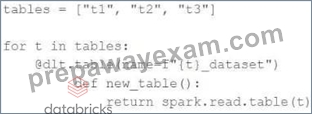
The pipeline runs an update with this refactored code, but generates a different DAG showing incorrect configuration values for these tables.
How can the data engineer fix this?
- A. Load the configuration values for these tables from a separate file, located at a path provided by a pipeline parameter.
- B. Wrap the loop inside another table definition, using generalized names and properties to replace with those from the inner table
- C. Convert the list of configuration values to a dictionary of table settings, using different input the for loop.
- D. Convert the list of configuration values to a dictionary of table settings, using table names as keys.
Answer: D
Explanation:
The issue with the refactored code is that it tries to use string interpolation to dynamically create table names within the dlc.table decorator, which will not correctly interpret the table names.
Instead, by using a dictionary with table names as keys and their configurations as values, the data engineer can iterate over the dictionary items and use the keys (table names) to properly configure the table settings. This way, the decorator can correctly recognize each table name, and the corresponding configuration settings can be applied appropriately.
NEW QUESTION # 143
A data engineer is developing a Lakeflow Declarative Pipeline (LDP) using a Databricks notebook directly connected to their pipeline. After adding new table definitions and transformation logic in their notebook, they want to check for any syntax errors in the pipeline code without actually processing data or running the pipeline. How should the data engineer perform this syntax check?
- A. Open the web terminal from the notebook and run a shell command to validate the pipeline code.
- B. Switch to a workspace file instead of a notebook to access validation and diagnostics tools.
- C. Use the "Validate" option in the notebook to check for syntax errors.
- D. Disconnect the notebook from the pipeline and reconnect it to a compute cluster to access code validation features.
Answer: C
Explanation:
Databricks provides a "Validate" option within the Lakeflow Declarative Pipeline development interface that checks pipeline configurations, transformations, and syntax errors before actual execution.
This feature parses and validates the pipeline logic defined in notebooks or workspace files to ensure correctness and consistency of table dependencies, DLT (Delta Live Table) syntax, and schema references.
The validation process does not process or move any data, making it ideal for testing new configurations before deployment.
Using the shell terminal (B) or workspace files (D) does not perform integrated pipeline-level validation, while reconnecting to compute clusters (C) is unrelated to syntax checks. Therefore, the verified and correct approach is A.
NEW QUESTION # 144
What is the first of a Databricks Python notebook when viewed in a text editor?
- A. # Databricks notebook source
- B. // Databricks notebook source
- C. %python
- D. -- Databricks notebook source
- E. # MAGIC %python
Answer: A
Explanation:
https://docs.databricks.com/en/notebooks/notebook-export-import.html#import-a-file-and-convert- it-to-a-notebook
NEW QUESTION # 145
A data engineer wants to join a stream of advertisement impressions (when an ad was shown) with another stream of user clicks on advertisements to correlate when impression led to monitizable clicks.
Which solution would improve the performance?
- A.

- B.

- C.

- D.

Answer: D
Explanation:
When joining a stream of advertisement impressions with a stream of user clicks, you want to Get Latest & Actual Certified-Data-Engineer-Professional Exam's Question and Answers from minimize the state that you need to maintain for the join. Option A suggests using a left outer join with the condition that clickTime == impressionTime, which is suitable for correlating events that occur at the exact same time. However, in a real-world scenario, you would likely need some leeway to account for the delay between an impression and a possible click. It's important to design the join condition and the window of time considered to optimize performance while still capturing the relevant user interactions. In this case, having the watermark can help with state management and avoid state growing unbounded by discarding old state data that's unlikely to match with new data.
NEW QUESTION # 146
The DevOps team has configured a production workload as a collection of notebooks scheduled to run daily using the Jobs UI. A new data engineering hire is onboarding to the team and has requested access to one of these notebooks to review the production logic.
What are the maximum notebook permissions that can be granted to the user without allowing accidental changes to production code or data?
- A. Can Edit
- B. No permissions
- C. Can Manage
- D. Can Read
- E. Can Run
Answer: D
NEW QUESTION # 147
A data engineer is designing a system leveraging Lakeflow Declarative Pipeline technology to process real-time truck telemetry data ingested from JSON files in S3 using Auto Loader. The data includes truck_id, timestamp, location, speed, and fuel_level. The system must support two use cases:
- Near-real-time monitoring of the latest location, speed, and
fuel_level per truck_id for the operations team.
- Daily aggregated reports of total distance traveled and average fuel
efficiency per truck_id for the management team.
Which approach should the data engineer use for streaming tables and materialized views in the Lakeflow Declarative Pipeline to meet these requirements?
- A. Define a streaming table to ingest and store the raw telemetry data, and create a materialized view to compute the latest location, speed, and fuel_level per truck_id for real-time monitoring.
Create another materialized view to compute the daily aggregated distance and fuel efficiency per truck_id for reporting. - B. Define a streaming table to ingest and store the raw telemetry data, and create a streaming table to compute the daily aggregated distance and fuel efficiency per truck_id reporting. Create a materialized view to compute the latest location, speed, and fuel_level per truck_id for real-time monitoring.
- C. Define a materialized view to ingest and store the raw telemetry data, and create a streaming table to compute the latest location, speed, and fuel_level per truck_id for real-time monitoring.Create another materialized view to compute the daily aggregated distance and fuel efficiency per truck_id for reporting.
- D. Define a streaming table to ingest and store the raw telemetry data, and create a streaming table to incrementally compute the latest location, speed, and fuel_level per truck_id for real-time monitoring. Create a materialized view to compute the daily aggregated distance and fuel efficiency per truck_id for reporting.
Answer: D
Explanation:
A streaming table is the right construct to ingest continuously arriving telemetry from Auto Loader.
Computing the latest per truck_id requires near-real-time incremental updates as new events arrive, which is best handled with a downstream streaming table. The daily aggregates are naturally suited to a materialized view, which maintains precomputed results for reporting and refreshes efficiently without requiring a continuously running streaming aggregation for a once- per-day consumption pattern.
NEW QUESTION # 148
A data engineer is using Lakeflow Declarative Pipelines Expectations feature to track the data quality of their incoming sensor data. Periodically, sensors send bad readings that are out of range, and they are currently flagging those rows with a warning and writing them to the silver table along with the good data. They've been given a new requirement ?the bad rows need to be quarantined in a separate quarantine table and no longer included in the silver table.
This is the existing code for their silver table:
@dlt.table
@dlt.expect("valid_sensor_reading", "reading < 120")
def silver_sensor_readings():
return spark.readStream.table("bronze_sensor_readings")
What code will satisfy the requirements?
- A. @dlt.table
@dlt.expect("valid_sensor_reading", "reading < 120")
def silver_sensor_readings():
return spark.readStream.table("bronze_sensor_readings")
@dlt.table
@dlt.expect("invalid_sensor_reading", "reading >= 120")
def quarantine_sensor_readings():
return spark.readStream.table("bronze_sensor_readings") - B. @dlt.table
@dlt.expect_or_drop("valid_sensor_reading", "reading < 120")
def silver_sensor_readings():
return spark.readStream.table("bronze_sensor_readings")
@dlt.table
@dlt.expect("invalid_sensor_reading", "reading >= 120")
def quarantine_sensor_readings():
return spark.readStream.table("bronze_sensor_readings") - C. @dlt.table
@dlt.expect_or_drop("valid_sensor_reading", "reading < 120")
def silver_sensor_readings():
return spark.readStream.table("bronze_sensor_readings")
@dlt.table
@dlt.expect_or_drop("invalid_sensor_reading", "reading >= 120")
def quarantine_sensor_readings():
return spark.readStream.table("bronze_sensor_readings") - D. @dlt.table
@dlt.expect_or_drop("valid_sensor_reading", "reading < 120")
def silver_sensor_readings():
return spark.readStream.table("bronze_sensor_readings")
@dlt.table
@dlt.expect("invalid_sensor_reading", "reading < 120")
def quarantine_sensor_readings():
return spark.readStream.table("bronze_sensor_readings")
Answer: A
Explanation:
Lakeflow Declarative Pipelines (DLT) supports data quality enforcement using @dlt.expect,
@dlt.expect_or_drop, and @dlt.expect_all.
@dlt.expect applies a rule and records whether rows pass or fail the condition but does not drop failing rows. Instead, failing rows can be written to a quarantine table.
@dlt.expect_or_drop enforces that only rows passing the condition flow downstream, dropping bad records automatically.
In this case, the requirement is:
Good rows (reading < 120) go to the silver table.
Bad rows (reading >= 120) go to a quarantine table.
Bad rows should not be included in silver.
The correct implementation is Option A, where:
The silver table uses @dlt.expect to validate reading < 120. These rows flow normally.
The quarantine table applies an expectation for reading >= 120, ensuring bad records are captured separately.
Other options are incorrect:
Option B/D: These either use expect_or_drop incorrectly or apply wrong conditions, leading to dropped rows without quarantining properly.
Option C: Uses expect_or_drop for both tables, which would discard bad rows instead of persisting them into a quarantine table.
Thus, Option A meets the business requirement to split good and bad data streams while ensuring both are captured for auditing and processing.
NEW QUESTION # 149
......
Pass Databricks Databricks-Certified-Data-Engineer-Professional Actual Free Exam Q&As Updated Dump: https://exam-hub.prepawayexam.com/Databricks/braindumps.Databricks-Certified-Data-Engineer-Professional.ete.file.html